
Leave Planner
Use the Leave Planner if you intend to request leave and you need to ensure other team members will be there in your absence.
The Leave Planner will display other staff within the same reporting group as you, plus your reporting Manager.
- Open the Leave Details menu
- Select Leave Planner
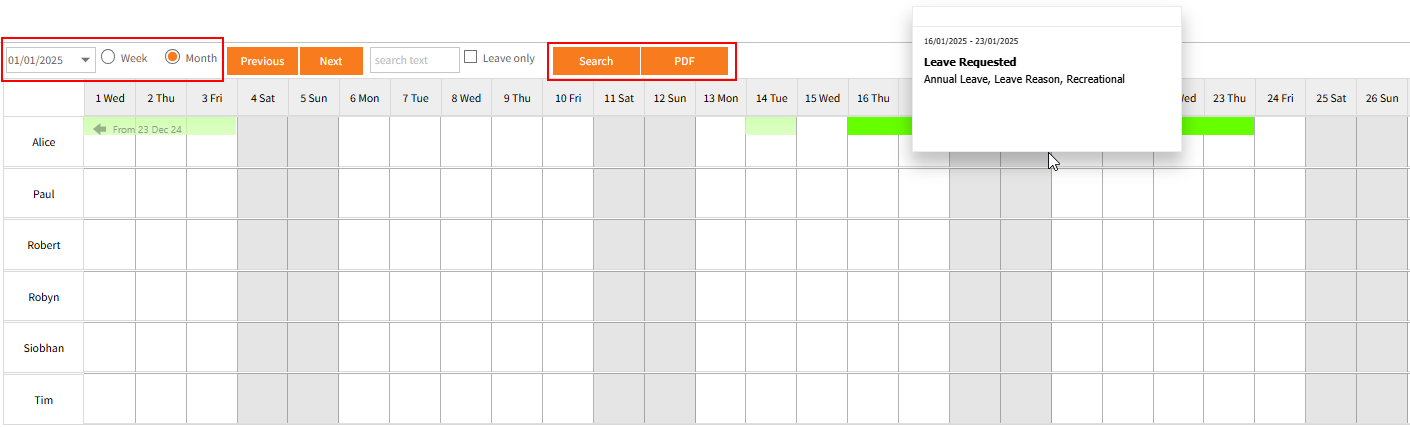
- Change the date to the required date.
- Select Week or Month for weekly or monthly views and click the Search button.
- Any Leave Requested or Approved in the date range selected will show with colour coding for the type of leave.
- Click the Previous or Next buttons to move through the weeks or months.
- The Leave Planner will display the leave planned during the time period specified.
- You can click on the PDF button to download and print/save a PDF copy of the Leave Planner view as you see it.
Return to Common Tasks (e.g. Leave Requests, Timesheets)